


Watching football on a phone sounds simple until the connection becomes part of the experience. FutbolLibre is built around that exact situation: finding live football matches online when I am away from a television or computer. I reviewed it as a sports app from Futbol Apps Pro, and my impression is fairly clear: it can be useful when I need a quick mobile viewing option, but it demands realistic expectations about connectivity and the limits of a phone-sized screen.
FutbolLibre is free to use and rated for Everyone, which makes it easy to consider as a casual option rather than a major commitment. It has reached over a million installs, and its average rating sits at 3.7 from around five thousand ratings. Those figures suggest that the app has a meaningful audience, while also hinting that the experience is not perfect for every viewer.
The app was released on August 18, 2024, and the version I considered is 4.1, compatible with Android 6.0 and later. That broad device compatibility is helpful if you are using an older phone, although the practical quality of live viewing will depend much more on your connection, device condition, and surroundings than on the installation itself.
How the connection changes the viewing experience
Live football is only as reliable as the route to it
The most important thing to understand is that FutbolLibre is not a replacement for a stable internet connection. Its purpose is to help you reach live football online, so the quality of the experience changes immediately when your network becomes crowded, weak, or inconsistent. A strong connection can make the app feel direct and convenient; a poor one can turn a promising match into a frustrating sequence of waiting, interruptions, or repeated attempts.
This matters especially during popular matches. A connection that feels perfectly adequate for messages or ordinary web pages may struggle with live video. Football also makes delays more noticeable than many other types of content. Missing a goal because the stream pauses for a moment is much more irritating than waiting for a static page to load.
My practical advice is to open the app before the match begins rather than waiting until the opening whistle. This gives you time to check whether the selected match loads properly and whether your current network is behaving well. It is a small habit, but it reduces the risk of discovering a problem at the exact moment the action starts.
Wi-Fi, mobile data, and the wrong kind of confidence
Wi-Fi is usually the safer choice for an extended live session, particularly at home or in a place with a dependable private network. Public Wi-Fi can be less predictable. Even when the signal icon looks strong, the network may be busy, restricted, or unstable. A phone connected to a crowded café network can therefore perform worse than expected.
Mobile data is more flexible because it lets you follow a match while travelling, waiting, or sitting somewhere without Wi-Fi. The trade-off is that live video can consume data quickly compared with ordinary browsing. I would not begin a long match on cellular data without first checking my plan and remaining allowance. The app is free, but that does not mean the connection needed to use it is cost-free.
A useful approach is to treat the first few minutes as a test. If the stream is already struggling before the match becomes busy, moving to a more stable network is better than repeatedly restarting the app. Restarting may help after a temporary error, but it cannot repair a weak signal or an overloaded connection.
Why a phone is convenient, but not always comfortable
FutbolLibre makes the most sense when convenience matters more than presentation. I can imagine using it while commuting, during a break, or when the television is occupied. A phone is personal and immediate, and that makes it valuable for checking in on a match without rearranging the rest of the evening.
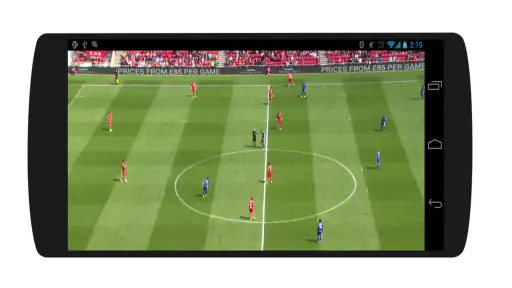
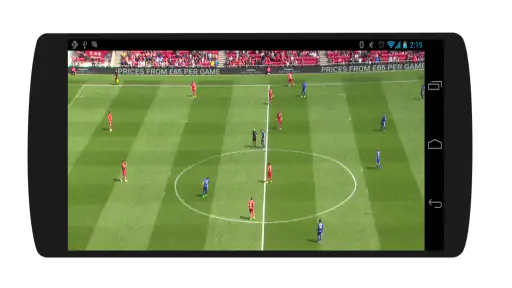
However, a mobile screen changes how I watch football. For a short check or an important stretch of play, it is perfectly practical. For a full match, the small display can become tiring, especially if I am holding the phone continuously or watching in a bright outdoor setting. The experience is also less social than watching on a larger screen with other people.
This is one of the key trade-offs. A traditional television service is generally better for a planned viewing session, while FutbolLibre is more appealing when I need mobility. A browser-based alternative may be preferable if I am already using a laptop, but a dedicated app can feel quicker when the phone is the device already in my hand.
A realistic everyday scenario
Imagine that I am leaving work shortly before a match starts. At home, I would normally use a larger screen, but I am still on the train and want to follow the beginning. I would connect to a reliable network if possible, open FutbolLibre early, locate the match, and keep the phone available rather than relying on a last-second search.
If the train enters an area with poor coverage, I would expect the viewing experience to suffer. That is not necessarily a fault unique to this app; it is the unavoidable weakness of live online video in motion. In that situation, the sensible choice is to stop fighting the stream and use a lower-demand way of following the result, if one is available elsewhere, until the connection improves. The app is useful for the mobile moment, but it cannot remove the limitations of the mobile network.
What happens when playback fails
Connectivity problems do not always look the same. Sometimes the app may take longer to open a match. Sometimes the image may pause while the connection catches up. In other cases, the issue may be temporary and disappear after returning to the match or reopening the app. The correct response depends on whether the problem is inside the app or outside it.
I would use a simple recovery order. First, check whether other online services are also slow. If everything is affected, changing location or network is more useful than repeatedly tapping the same option. If the rest of the phone works normally, close and reopen the match, then try again. If the problem continues, restarting the app is a reasonable next step.
It is also worth avoiding several changes at once. If I switch networks, restart the phone, and reopen the app simultaneously, I cannot tell what fixed the issue. A calm, step-by-step approach is less frustrating and makes future problems easier to diagnose.
When the app is not the right choice
I would skip FutbolLibre if I needed guaranteed reliability for a major event, a large-screen experience, or a carefully planned gathering. In those situations, a dedicated television or official subscription service may be a better fit because the priorities are stability, comfort, and predictable access rather than quick mobile convenience.
I would also hesitate to depend on it when travelling through areas with inconsistent coverage. The app cannot make a weak signal strong, and live football is particularly unforgiving when the connection drops. Someone who mainly wants scores, fixtures, or occasional updates rather than live viewing may be better served by a football results app designed around lightweight information.
On the other hand, I think it suits viewers who want a free way to try following matches online from an Android phone. The minimum operating system requirement of Android 6.0 or later keeps it within reach of many older devices. That does not guarantee smooth playback on every phone, but it does make the app accessible to people who are not using the newest hardware.
Using mobile data without unpleasant surprises
The safest data-conscious habit is to decide in advance how long I intend to watch. A short check during a break is very different from leaving a live match running for a long period. I would avoid starting a session when the phone is already low on battery, because live video, screen brightness, and a mobile connection can place a heavier load on the device than ordinary reading.
Location also matters. Watching indoors near a stable router is a different task from watching in a moving vehicle or at the edge of coverage. If I am using cellular data, I would keep an eye on the phone’s data controls and avoid assuming that a free app means unlimited viewing. The cost question belongs to the network plan as much as to the app itself.
Another useful habit is to prepare the phone before the match. Closing unnecessary background activity, charging the device, and choosing a location with a stronger signal can make the session less fragile. None of these steps adds a new feature to FutbolLibre, but they directly improve the conditions in which the app has to work.
Finding the balance between speed and patience
Live viewing encourages impatience because every delay feels urgent. I found it more helpful to give the app a moment to establish the match instead of repeatedly switching away and back. Constantly refreshing can make a weak connection feel even more chaotic and may use additional data without solving the underlying issue.
If the match loads but becomes unstable, I would first move to a better signal before blaming the app. If several different networks produce the same result, then the app itself becomes a more likely source of the problem. This distinction is important because it prevents wasted time and gives me a clearer idea of whether FutbolLibre is suitable for that particular viewing situation.
What the rating tells me, and what it does not
The 3.7 average from roughly five thousand ratings gives FutbolLibre a middle-ground reputation. I read that as a sign that the app works well enough for many casual users but may also produce uneven experiences. Live sports apps are especially sensitive to conditions outside the software, so ratings can reflect network quality, device differences, expectations, and match-day demand as well as the app itself.
There are around sixty-five written reviews, which is enough to show that users have shared more than a simple star score, but not enough for me to treat every individual experience as universal. I would use the rating as a reason to approach the app with an open mind, not as proof that it will perform identically on my phone.
Developer, audience, and practical expectations
Futbol Apps Pro positions this product in the sports space, specifically around live football access. The Everyone content rating makes it suitable for a broad audience from an age-classification perspective. That does not change the practical considerations: parents, younger viewers, and adults alike still need to think about connection stability, screen time, and mobile data.
The app’s broad reach is encouraging for someone who wants a straightforward starting point, but popularity should not be confused with a guarantee of premium service. I would judge it by the situation in which I plan to use it. For occasional mobile viewing, it has a clear purpose. For dependable, uninterrupted watching, I would compare it with more established viewing arrangements before making it my only option.
My final connectivity verdict
FutbolLibre is most convincing as a flexible companion for live football moments rather than as a complete replacement for every other way of watching. I like the fact that it is free, works with an older Android baseline, and focuses on a need that is easy to understand: reaching football matches online from a phone.
Its biggest strength is also its biggest limitation. Because the experience depends on live connectivity, the app can be convenient one day and frustrating the next, depending on signal quality, network congestion, location, and device conditions. That makes preparation more important than it might be with an offline sports tool or a simple score tracker.
I would recommend trying FutbolLibre if you regularly need a mobile football option and are comfortable testing your connection before an important match. I would not recommend relying on it blindly for a must-see event, travelling through unreliable coverage, or replacing a comfortable large-screen setup. In my view, the right way to use it is as a practical free option with clear boundaries: choose a stable network, watch your data, allow time for recovery when problems appear, and keep a more dependable alternative in mind when the match truly matters.


